
Economy
Building placement: why your layout is your greatest weapon
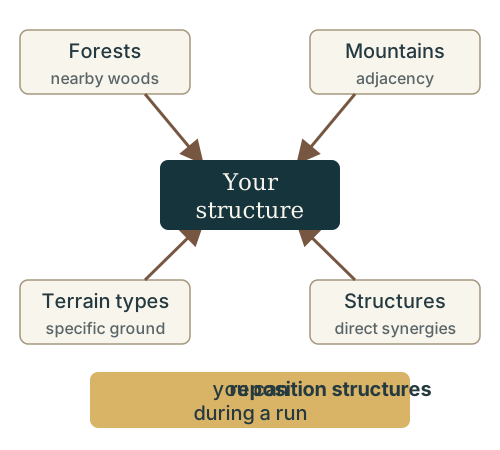
Where you put a structure matters as much as what you build. The developers describe structures that want to be near forests, that benefit from adjacency to mountains or specific terrain types, and that synergize with each other directly — and you can reposition your structures during a run.
Placement principles come from the official overviews; the examples below include demo balance patch 0.77.111d (October 12) and hotfix 0.77.118d (October 13). Exact board geometry is not specified in those notes.
Updated
What your structures care about
The official store description sets the direction: economic buildings near resources boost their production. The developers’ gameplay overview goes further: some structures want forests nearby, some benefit from mountains or specific terrain, and others synergize with neighboring structures. In their words, every settlement becomes an optimization puzzle over limited space.
On this page
A placement checklist for every round
- Read the structure’s own description first. It tells you what this building wants nearby — a resource, a forest or mountain, a terrain type, or a partner structure.
- Match it to the map. If the description names a resource, seat the building beside that resource; if it names terrain, look for that terrain on your plots.
- Cluster structures that synergize. Some buildings benefit each other directly; place those as deliberate neighbors rather than wherever a gap is free.
- Count what an empty tile is already doing. Occupying it can reduce an empty-tile bonus. Compare that loss with what the new structure adds; filling every gap is not automatically an improvement.
- Leave room to change your mind. Placement is not permanent, so plan for the settlement you will want a few rounds from now.
- Re-check after fate cards. A new blessing can change which neighbors are worth having (see below).
The target and the empty space both matter
The October 12 balance patch gives concrete reasons to read every word of a condition. Hunters Lodge gives each adjacent UNIT 6/12/18 Damage. Wolf Den gains 5/10/15 Damage for each adjacent BEAST; that condition changed from NATURE. The right neighbor category matters as much as having a neighbor. Compare Defense Tower, Watchtower, Hunters Lodge, Woodcutter and Wolf Den by trigger, recipient and effect before you move them.
Empty space has conditions too: Scout Camp and Sheepfold count empty colonized tiles, while patch 0.80.30p removes Healer’s Hut’s adjacent-empty-tile Healing bonus. Do not preserve a gap for that removed effect. The empty tiles income and healing guide compares their values and shows what happens when one qualifying tile becomes occupied.
For the map you start on, the developers’ October 15 update confirms at least one special tile in every starting area. That guarantee does not identify which special tile you will receive or give an exact opening layout.
Cards care about placement too
Placement is not only a buildings concern. In the developers’ official demo image, the blessing card Sentinels grants WARBAND units armor for each adjacent TOWER — a card whose value is decided by how you built. The point is structural: adjacency conditions appear on cards, not just on buildings. Check the card’s own text in the current build for its exact condition and values.
Global blessings in particular can “completely change how you think about positioning and synergies”, in the developers’ words. When a blessing rewards a specific arrangement, rearranging your settlement to serve it is part of the game.
You can reposition during a run
Placement decisions are reversible: the developers state that you can reposition your structures during a run, so your settlement is always evolving. A layout that served your early economy can be reshaped around the warbands and blessings you end up with.
Make it a habit
Before you place anything, open the structure’s description and look for what it wants nearby — a forest, a mountain, a terrain type or a neighbor — then give it that spot.
A pickup click prevents placement, or Next stops working
Update the demo to 0.77.100d or later before treating this symptom as a layout mistake. The developers’ patch notes, published October 8, say low FPS or lag spikes could register a single click twice, preventing placement when picking up a building. The same bug could also freeze Next in some cases.
This is a fix for one input bug, not a change to terrain or adjacency rules. On an updated build, continue checking the structure’s own description if placement is still refused. See the demo’s technical fixes for the patch source and portrait-screen resolution note.
Sources: Developers’ gameplay overview (placement and repositioning, 1:15–1:46), the official Steam description, the September 30 announcement with the official demo image, balance patch 0.77.111d (October 12), Demo Hotfix2 0.77.118d in the official news feed (October 13), October 15 feedback update (starting-area guarantee), and demo patch 0.77.100d (published October 8; input bug fix).